
Gesturely.
Do more with three fingers.
Gestures, snapping and brightness for your trackpad. $5, with a 14-day free trial.
Not signed by Apple yet. I'm a student indie developer and haven't paid for Apple's $99/year developer certificate yet, so macOS will warn you the first time you open the app. To open it: System Settings → Privacy & Security → scroll down → Open Anyway. The app is safe and only does what it says. I'll sign it as soon as sales cover the cost.
By the numbers.
One price. Any 1.x updates are free.
days to try it, with everything working
gestures, each one yours to remap
Macs on one license
analytics, trackers or ads
Gestures
Swipe and tap with three, four or five fingers.
| Trigger | Default action |
|---|---|
| 3-finger swipe up / down | Volume up / down, with the native volume overlay |
| 3-finger swipe left / right | Move the window under the pointer to the left / right half |
| 3-finger tap | Maximize the window (menu bar and Dock stay visible) |
| 4-finger tap | Capture a selected area |
| 5-finger tap | Capture the whole screen |
Every trigger can be reassigned or switched off. Other actions: mute, play / pause, next track, previous track, or nothing.
While three or more fingers are down, Gesturely stops macOS from scrolling. A thumb resting still near the bottom edge isn't counted as a finger.
Brightness edge
Slide one finger along the right edge to change brightness.
- Slow slides make fine changes (a full-length slide is about 25%). Quick flicks make big ones.
- It starts only when a single finger touches down inside the zone and moves vertically. A finger that drifts in, a resting palm or a second finger never triggers it.
- The pointer stays put while you slide, and a small level bar shows the brightness.
- Adjust the zone width (5–15% of the trackpad), sensitivity and acceleration, or invert the direction. Off by default.
- Works on the built-in display. External monitors aren't supported and are left unchanged.
Window snapping
Drag a window to an edge and it snaps into place.
- Left or right edge for a half, the top to maximize, a corner for a quarter.
- A preview shows where the window will land.
- Drag it away again to get its old size back.
Screenshots
Capture with a tap.
- Four-finger tap: drag a box to capture just that area. Space picks a window, Esc cancels.
- Five-finger tap: capture the whole screen.
- Send captures to the clipboard or to a PNG on the Desktop, with or without the shutter sound.
Settings
Everything in one window.
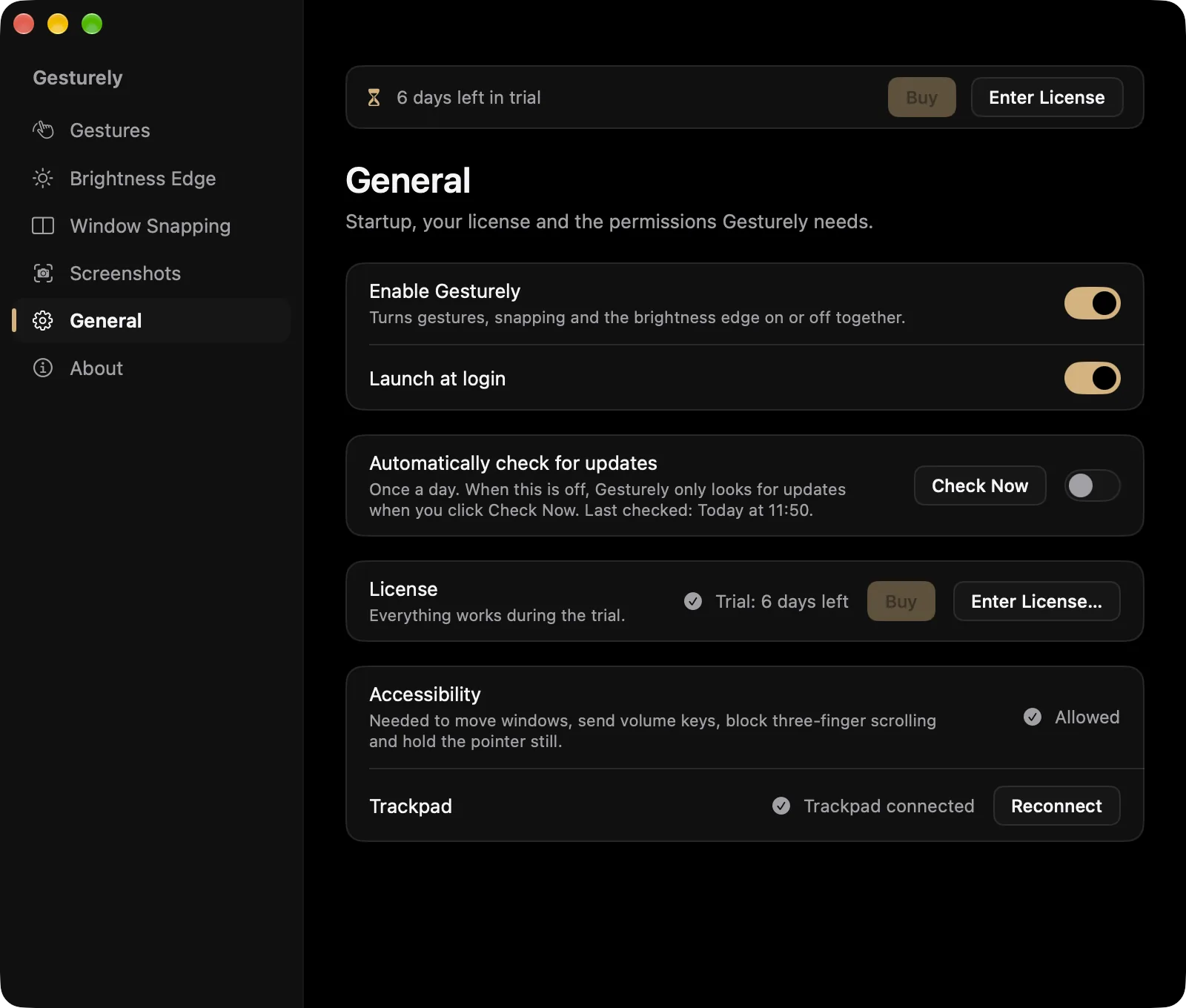
- Turn gestures, snapping and the brightness edge on or off together, and launch at login.
- A health check shows whether Accessibility is allowed and the trackpad is connected, with a button to fix each.
- Automatic update checks are off until you switch them on. Check Now is always there.
And the small things.
Live trackpad preview
Settings shows your fingers as dots, so you can see exactly what Gesturely sees.
Set up in a minute
A short welcome walks you through Accessibility, a first swipe and Launch at Login. A health check in Settings has a Fix button for each.
Light on your Mac
Touch handling does no allocation or locking per frame. With nothing switched on, the touch stream stops entirely.
Offline is fine
The license is re-checked about once a week when you're online. Being offline never locks the app.
Updates when you ask
Check for updates from the menu or Settings. Automatic checks stay off unless you turn them on.
Lives in the menu bar
Turn everything on or off from one menu. Works with the built-in trackpad or a Magic Trackpad.
Private by design. Your touches never leave your Mac.
- Your touchesStay on your MacRead, used and discarded on the spot
- AnalyticsNoneNo telemetry, no crash reports sent anywhere
- License checksKey and hashed IDNever your Mac's name, username or serial number
- UpdatesWhen you askAutomatic checks are off by default
Requirements
- macOS13 or later
- MacApple Silicon
- TrackpadBuilt-in or Magic Trackpad
- PermissionsAccessibility, and Screen Recording for screenshots
- InternetOnce, to activate a license
Avoid clashes with macOS gestures
In System Settings → Trackpad → More Gestures, switch off or move to four fingers anything that uses three: Swipe between full-screen apps, Mission Control and App Exposé.
Also check that Point & Click → Look up & data detectors isn't set to “Tap with three fingers”.
On macOS 15 or later, turn off Desktop & Dock → Windows → Drag windows to screen edges to tile, so the two snapping features don't fight.
Opening it the first time.
Gesturely isn't signed with an Apple Developer ID yet, so macOS blocks the first launch. You only need to do this once.
- Unzip Gesturely-1.1.0.zip and drag Gesturely.app into your Applications folder.
- Open Gesturely. macOS says it can't verify the app. Close the message with Done (or OK / Cancel). Don't choose Move to Trash.
- Open System Settings → Privacy & Security.
- Scroll down to Security. Next to the message that Gesturely was blocked, click Open Anyway.
- Confirm with your password or Touch ID, then click Open Anyway once more.
- The welcome screen opens. Click Open Settings… and switch Gesturely on in the Accessibility list. It starts working straight away, with no relaunch.
On macOS 13 and 14 you can also right-click (or Control-click) Gesturely.app, choose Open, then Open again. Replacing a copy older than 1.1? Your settings carry over, but allow Accessibility again and re-enable Launch at Login.
Questions.
How does the free trial work?
Gesturely is free for 14 days on your Mac, with everything working. Settings shows how many days are left, and there's one reminder on the last day.
After the trial, gestures and the brightness edge pause until you enter a license key. Window snapping and your settings stay.
Can I get a refund?
Purchases are final, except when the app doesn't work on a supported Mac (macOS 13 or later, Apple Silicon) and I can't help you fix it, or when the law where you live gives you a right to a refund. That's what the 14-day trial is for, so please try it fully first.
What does Gesturely send over the internet?
Your touches are read, used and discarded on your Mac. They never leave it, and there's no analytics or telemetry.
Gesturely goes online only to check your license (it sends the license key and a hashed device ID that can't be turned back into your Mac's hardware ID) and, if you ask, to check for updates. It never sends your Mac's name, your username or its serial number.
Does it update itself?
Not unless you want it to. Automatic update checks are off by default. You can check by hand from the menu bar or Settings, or turn on daily checks in Settings → General.
Gesturely is sold as-is. Future updates aren't guaranteed, but any 1.x updates I release are free.
How many Macs can I use it on?
One license works on up to 3 Macs you own or control. To move it to another Mac, click Deactivate This Mac in the license window to free a slot.
Do I need to be online?
Only once, to activate your license key. Not during the trial. After that the license is re-checked about once a week when your Mac is online, and being offline never locks the app.
Why does macOS say it can't verify the app?
Gesturely isn't signed with Apple's paid developer certificate yet. Here's how to open it; you only do this once.
Try it free
for 14 days.
Everything works during the trial. No account, no card.